Introduction
K-12 districts run on data — enrollment records, home addresses, schedules, attendance — and most of that data lives in a Student Information System. The problem is that dozens of other platforms also need that same information: learning management systems, communication tools, assessment platforms, and transportation software. Without integration, staff manually re-enter student records across every one of those systems.
The result is predictable: conflicting records, outdated rosters, and staff hours consumed by data entry instead of student support. According to the Data Quality Campaign, 98% of principals say they need access to reliable student data to help students succeed — yet only 44% of districts have a formal data interoperability strategy to make that access consistent.
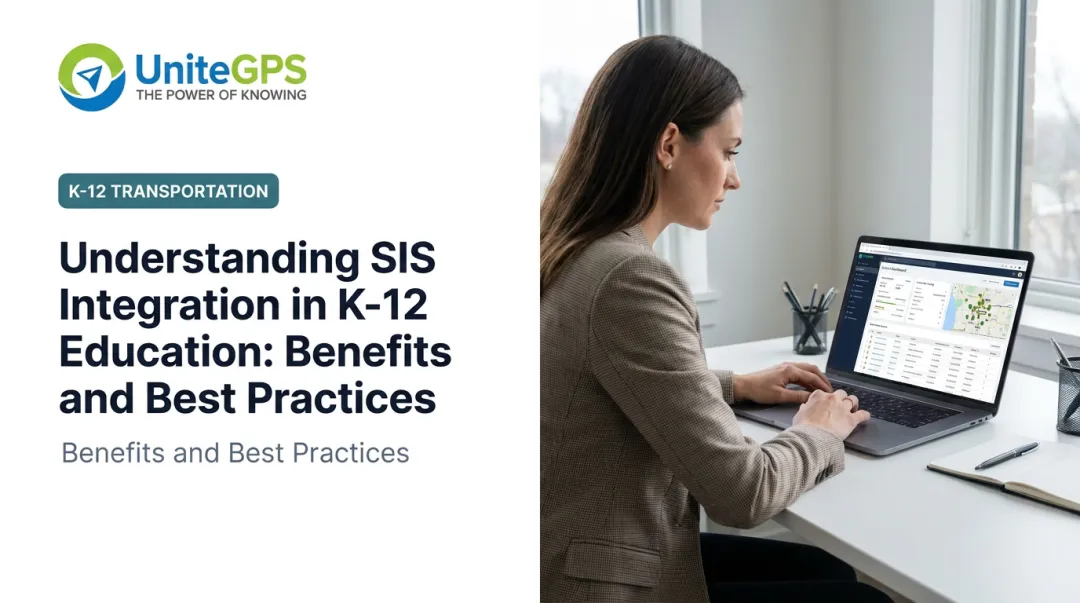
What follows covers the what, why, and how of SIS integration — including what transportation departments specifically stand to gain and how to avoid common rollout mistakes.
Key Takeaways:
- SIS integration auto-syncs student data, eliminating manual re-entry across platforms
- Transportation carries the highest operational risk from stale enrollment data
- OneRoster v1.2 is the data exchange standard to require in vendor procurement
- FERPA compliance needs contractual and technical controls — not just vendor assurances
- A phased pilot prevents costly mistakes before full district rollout
What Is SIS Integration in K-12 Education?
A Student Information System is the district's central record for everything student-related: enrollment status, home addresses, schedules, grades, attendance, and demographics. It functions as the single authoritative source for who a student is, where they live, and what school they attend — used daily by staff, teachers, students, and parents alike.
SIS integration is the process of connecting that central system to other district software platforms so student data flows automatically between them. Instead of a transportation coordinator manually importing an enrollment file, or an instructional technology coordinator re-entering rosters into an LMS, connected platforms receive updated data on a scheduled or real-time basis.
The SIS Platforms Districts Already Use
Four vendors account for 45% of the K-12 SIS market, according to Info-Tech Research. ListEdTech's 2023 market tracker breaks that down further:
- PowerSchool — 23% of implementations
- FACTS SIS — 13%
- Infinite Campus — 9%
- Skyward — rounds out the top four
These platforms serve as the upstream source that downstream tools — routing software, LMS platforms, communication systems — connect to through integration. When districts evaluate new tools, confirming compatibility with their existing SIS is one of the first technical questions to resolve.
Key Benefits of SIS Integration for School Districts
Eliminating Redundant Data Entry
When student enrollment, address, or schedule information changes in the SIS, integration propagates that update automatically to every connected platform. Staff no longer need to update a routing system, a communication tool, and an assessment platform separately. One change, made once, flows everywhere it needs to go.
The knock-on effect is data consistency. Conflicting records — where one system shows a student at one address and another shows a different address — are a direct product of manual, siloed data management. Integration closes that gap structurally.
Reducing Reporting Overhead
Required state and federal reporting draws heavily from the same student data districts manage every day. The U.S. Department of Education estimated 2,191,180 burden hours across roughly 17,884 LEAs for a single Civil Rights Data Collection cycle. When SIS data is accurate and current throughout the year, populating required reports becomes a pull rather than a scramble.
The risk runs in both directions. More than 70 Texas school districts asked the state education agency to delay full implementation of a new student data reporting system in 2024 — a sign of what happens when reporting infrastructure isn't aligned with operational systems from the start.
Building a Flexible Technology Ecosystem
Districts with strong SIS integration can select best-fit tools for each department rather than forcing every function into a single all-in-one platform.
- Transportation teams use specialized routing and ridership software
- Instructional staff use purpose-built LMS tools
- Communications teams use dedicated parent notification platforms
- Assessment teams use dedicated data tools
Each platform does what it does well — and all of them draw from the same accurate student records. This is a meaningful advantage over an all-in-one approach that often makes necessary tradeoffs across departments.
Closing the Interoperability Gap
Data from Project Unicorn shows that 80% of districts have a clear vision for data use, but only 44% have a strategy for data interoperability. That gap explains why many districts have good SIS data but still rely on manual exports and re-imports between systems.
Integration strategy goes beyond technology. It requires governance, defined procurement requirements, and clear ownership across departments — factors worth evaluating when selecting any vendor that connects to your SIS.
Common SIS Integration Methods and Standards
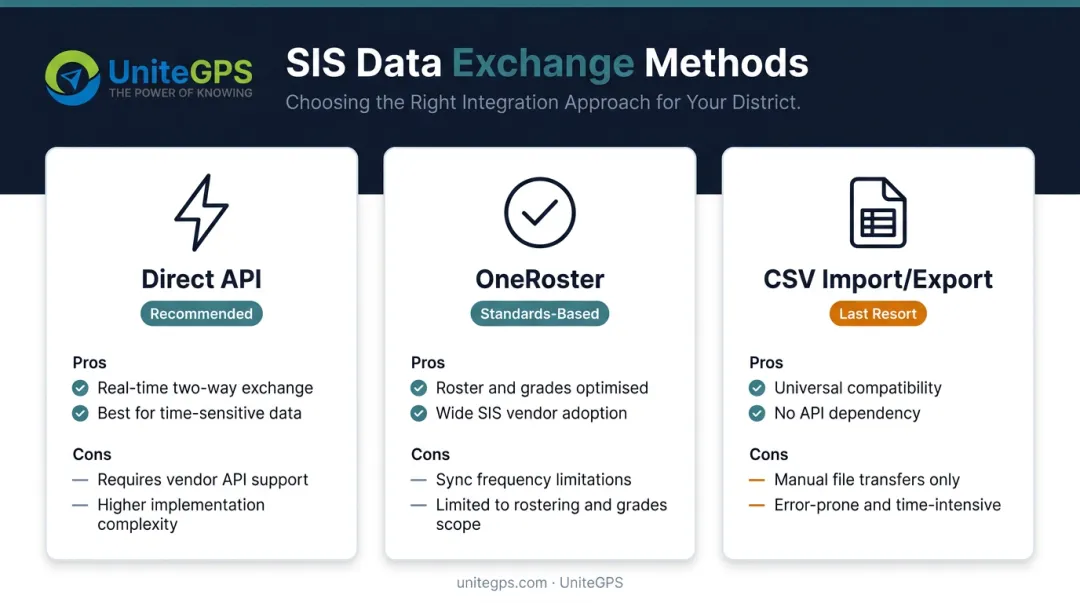
There are three primary ways SIS data moves between systems. Each carries different tradeoffs.
| Method | How It Works | Best For |
|---|---|---|
| Direct API | Real-time, two-way data exchange between platforms | High-frequency or time-sensitive data |
| OneRoster | Standards-based roster exchange using a common data language | Rostering, course assignments, grades |
| CSV Import/Export | Manual file download and re-upload between systems | Last resort; most error-prone |
OneRoster: The Key Standard for Roster Exchange
1EdTech's OneRoster standard covers roster information, course materials, and grades — the core data schools need to exchange between an SIS and downstream platforms. OneRoster v1.2, the current release (finalized September 19, 2022), defines services in both REST API and CSV exchange patterns.
When both the SIS and the downstream tool are certified against the same standard, setup is faster and more reliable than a custom-built connection. Districts can verify whether a product carries 1EdTech certification through the official 1EdTech product directory before signing a contract.
FERPA and Data Security
SIS integration opens new pathways for student personally identifiable information (PII) to travel between systems. That makes security architecture a core part of any integration decision — not an afterthought.
The U.S. Department of Education's Privacy Technical Assistance Center is clear: districts may share education records with vendors only under specific conditions:
- The vendor performs an institutional service on behalf of the school
- The vendor operates under direct school control for education-record data
- The data is used only for authorized purposes
- A written agreement specifying those terms is in place
The stakes are real. The FTC announced a 2025 action against Illuminate Education for failing to secure student personal data, and a multistate settlement related to student data security failures reached $5.1 million. Before finalizing any integration, districts should confirm vendor data handling practices in writing — not after a breach occurs.
How Transportation Departments Benefit from SIS Integration
The Core Problem Without Integration
Transportation departments need accurate, current student data to assign routes and stops correctly: home addresses, enrollment status, grade level, and eligibility flags. Without SIS integration, that data must be manually re-entered or imported into the routing platform — and when students enroll, transfer, or move mid-year, transportation staff have to catch and apply each change themselves.
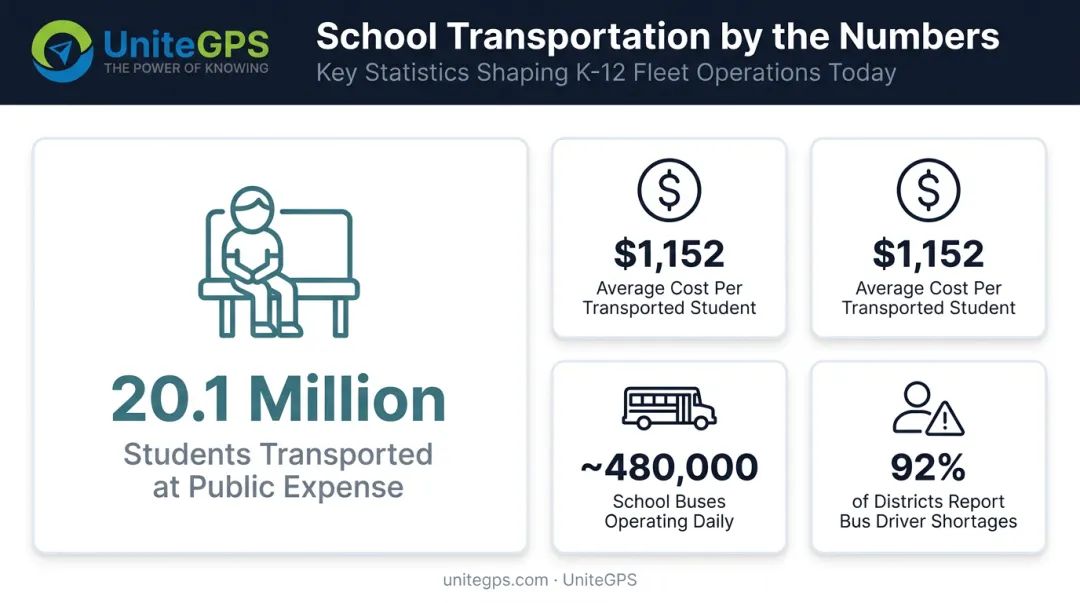
The operational scale makes this expensive. NCES reports that 20.1 million public school students were transported at public expense in 2018-19, at $1,152 per transported student. About 480,000 yellow school buses operate daily. Small data errors don't stay small at that scale.
Staffing pressure compounds the problem. NCSL reported in 2024 that 92% of education and transportation staff in a cited survey faced bus driver shortages. When teams are already stretched, manual roster reconciliation isn't just inefficient — it crowds out work that actually keeps students safe.
What Integration Makes Possible
When the SIS syncs directly with a transportation management platform, student rosters and addresses update automatically. Route assignments reflect current enrollment without staff intervention.
This matters most at the start of the school year, when enrollment volumes are highest and the margin for error is lowest. It also matters mid-year — when a student moves or transfers schools, a daily sync surfaces that change through an action center so transportation staff can respond quickly rather than discovering the mismatch after a missed pickup.
Accurate records carry downstream benefits that compound across the school year:
- Drivers know who should board each bus, and the system flags discrepancies when a student doesn't appear or shows up on the wrong route
- Correct address and route data from day one cuts reactive problem-solving — and parent calls along with it
- Mid-year changes flow in automatically, so staff aren't reconciling spreadsheets when a family moves
UniteGPS Crosswalk and SIS Integration
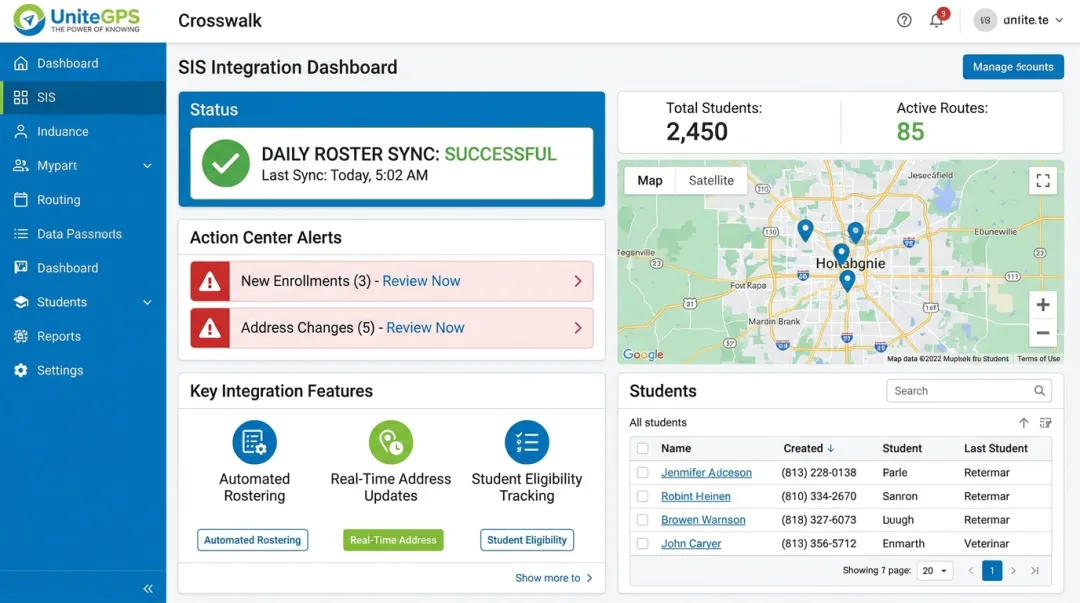
UniteGPS Crosswalk syncs student enrollment data directly from major SIS platforms — including PowerSchool, Infinite Campus, Skyward, and Harmony — on a daily basis, removing manual re-entry for transportation teams. Key features of the integration include:
- Daily roster sync: Names, addresses, school assignments, and mid-year changes pull in automatically
- Action center alerts: New enrollments, address changes, and disenrollments are flagged each morning so routing staff can act without cross-referencing spreadsheets
- No SIS transportation module required: The integration works independently of the SIS transportation module
- FERPA-compliant data handling: Full encryption and role-based access controls are built in
Best Practices for Implementing SIS Integration in K-12
Define Goals and Scope First
Before any technical work begins, identify which departments and workflows will connect first, which specific data fields need to flow between systems, and what measurable outcome you expect. Trying to integrate everything at once is how projects stall or produce difficult-to-untangle errors.
A narrow first scope (for example, syncing enrollment and address data to the transportation platform only) is easier to validate and faster to troubleshoot than a district-wide integration launched simultaneously.
Verify Compatibility Before Committing
Confirm that both the SIS and the target platform support the same integration standards or APIs. Go beyond vendor marketing materials: contact other districts that have completed the same integration and review technical documentation directly. If a vendor claims OneRoster compatibility, look them up in 1EdTech's certification directory.
Match Sync Frequency to Operational Criticality
Not all data needs to sync at the same rate:
- Real-time or same-day: Daily attendance, transportation rosters, address changes affecting same-day routing
- Nightly: Enrollment updates, schedule changes, staff roster updates
- Weekly or less frequent: Grade-level updates, demographic fields not tied to immediate operations
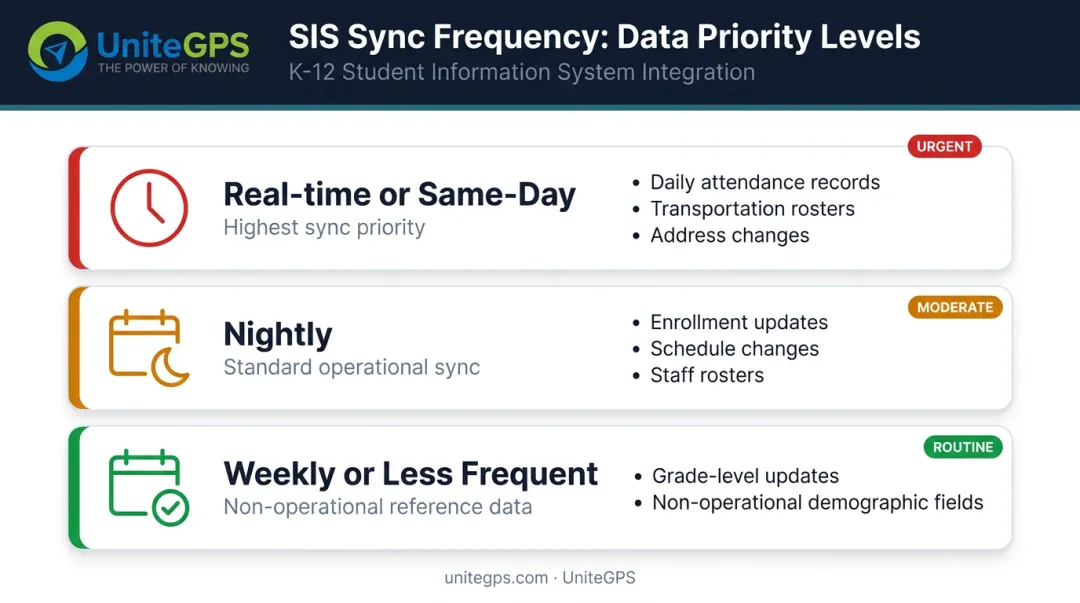
Choosing real-time syncing for everything adds unnecessary system load. Choosing nightly syncs for high-stakes data leaves critical records stale. Match the frequency to what would actually cause a problem if the data were 24 hours old.
Map Data Fields Before Go-Live
One misaligned field (a student ID format difference between the SIS and the downstream platform, for example) can cause records to fail silently or generate duplicates that are difficult to untangle after the fact.
Before go-live, complete a dedicated technical review session with both vendors to align:
- Field names and ID formats across both systems
- Data structures and accepted value types
- How each system handles null or missing records
Pilot First, Then Expand and Monitor
Start with one school, grade level, or department before rolling out district-wide. A controlled pilot exposes configuration issues without affecting every department at once.
After go-live, set up monitoring or error logs to catch sync failures early. Assign clear ownership for maintaining the integration — staff turnover is the most common reason problems go unaddressed.
The person who knows how the integration is configured needs a backup and a documented handoff process.
Done well, SIS integration fades into the background — routing staff stop reconciling spreadsheets and get back to the work that keeps students safe. The right partner treats that setup as part of the job, not an upsell: UniteGPS assigns a named implementation contact who configures the sync alongside your team and stays until it runs cleanly. We don't sell you software and walk away — we stay, we share what we know, and we help you build a transportation operation your district can be proud of. Great student transportation starts with great leaders — and we build both, the system and the people who run it.
Frequently Asked Questions
What are SIS integrations?
SIS integration connects a Student Information System to other district platforms — such as routing software, LMS tools, or communication systems — so student data flows automatically between them. Enrollment updates, address changes, and schedule changes propagate without manual re-entry, keeping records consistent across every connected tool.
What data does SIS integration share with transportation systems?
Transportation-focused SIS integrations sync student home addresses, enrollment status, grade level, and disenrollment flags — everything routing and ridership systems need to assign stops and track boardings. Academic records, grades, IEPs, and health information fall outside a transportation-scoped integration and should never be pulled into a routing platform.
Is SIS integration FERPA compliant?
SIS integration can be FERPA compliant when connected platforms use proper data security practices: role-based access controls, encryption in transit and at rest, strict data minimization, and a formal written agreement designating the vendor as a school official. Districts should verify FERPA compliance with every vendor before student PII flows through any integration.
What if we don't have the transportation module in our SIS?
You don't need it. A common concern — especially with PowerSchool — is that a district can't identify who's a bus rider without the SIS transportation module. A purpose-built integration like UniteGPS Crosswalk syncs enrollment, address, and rider data directly and identifies bus riders on its own, without requiring that add-on module.
Does the integration pull data one direction, or both?
For transportation, the sync that matters most is inbound: student enrollment, addresses, and eligibility flow from the SIS into the routing platform on a daily automated feed. Each morning, an action center surfaces exactly what changed overnight — new students, address changes, and disenrollments — so staff act on current data without manual re-entry or spreadsheet comparison.
Is it compatible with Infinite Campus if our state is switching from PowerSchool?
Yes. Crosswalk integrates with the major SIS platforms — PowerSchool, Infinite Campus, Skyward, and Harmony — so a statewide migration between systems doesn't strand your transportation data. Confirm the specific integration path with your vendor as part of the migration plan.
How long does implementation take, and what does it require from us?
Not much from you — that's the point. A named implementation contact configures the SIS data feed alongside your team and builds your initial routes, and GPS devices ship pre-labeled and pre-assigned, so installation is plug and play. Most districts have the sync and core routing live within weeks, and the 90-day free trial covers the entire setup, so you're never doing the heavy lifting alone.
Can we do year-to-year? Our board restricts long-term contracts.
Yes. UniteGPS contracts are year-to-year with annual invoicing — no multi-year commitment — and the terms go in writing on the quote. That matters for districts whose board or legal counsel limits agreements to a set term.