Student transportation departments face more pressure to modernize than ever, even as staffing gets tighter and parent expectations climb every year. A 2022 Pollfish survey commissioned by Zum found that 64% of parents consider the school transportation system antiquated, and two in three want to track their child's bus boarding as easily as a package delivery.
Driver tablets often get filed under "nice-to-have" technology, mentioned alongside dash cams and Wi-Fi. But the real payoff for transportation directors shows up in daily operations: fewer wrong turns, faster substitute driver onboarding, and ridership records that hold up during a parent dispute.
This article breaks down what driver tablets actually do inside a bus cab, the operational advantages tied to metrics transportation directors already track, and how tablets fit into a broader transportation management platform instead of standing alone as disconnected hardware.
TL;DR
- Driver tablets combine navigation, ridership scanning, and dispatch into one device, replacing paper sheets and radios.
- Digitized routes and stop details shorten the learning curve for substitute drivers.
- Real-time GPS and ridership data cut parent calls while improving boarding accountability.
- Integrated platforms extend tablet data into Medicaid billing and eliminate manual SIS entry.
What Are Driver Tablets in School Bus Operations
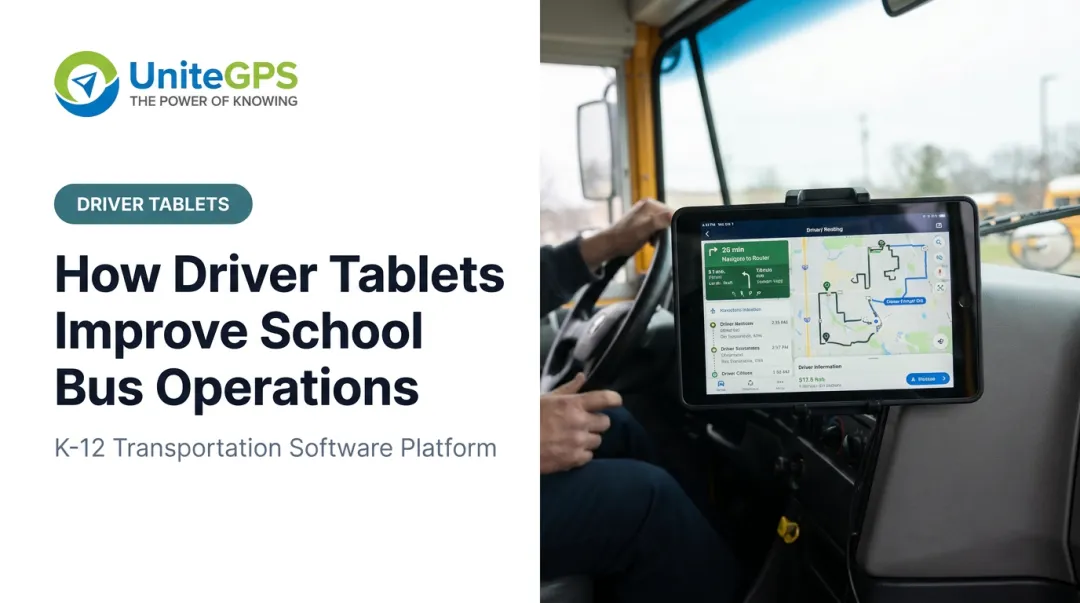
A driver tablet is a ruggedized or standard tablet mounted in the bus cab that runs transportation software instead of paper folders and clipboards. It gives the driver digital access to routes, student rosters, stop sequences, and a communication channel back to dispatch.
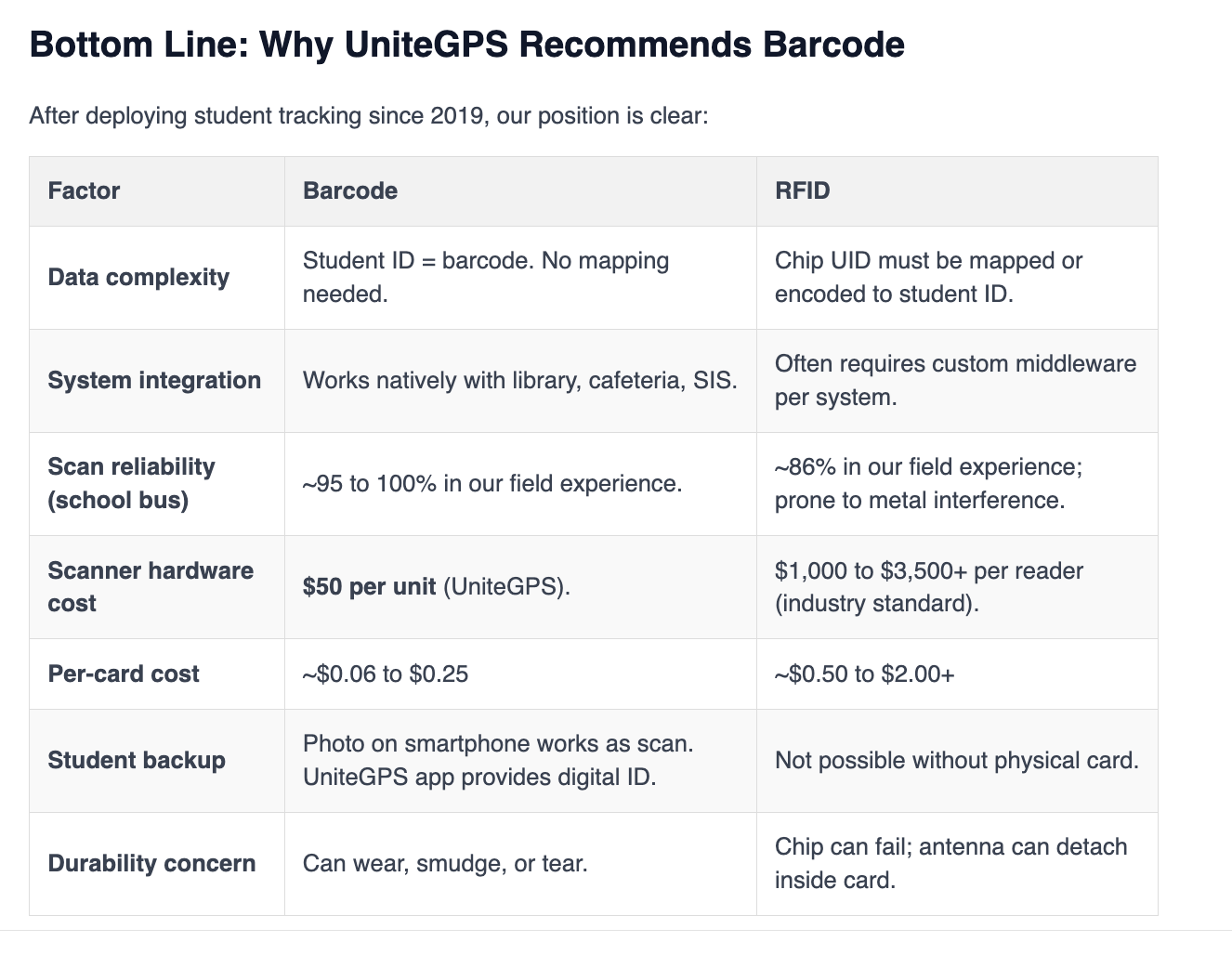
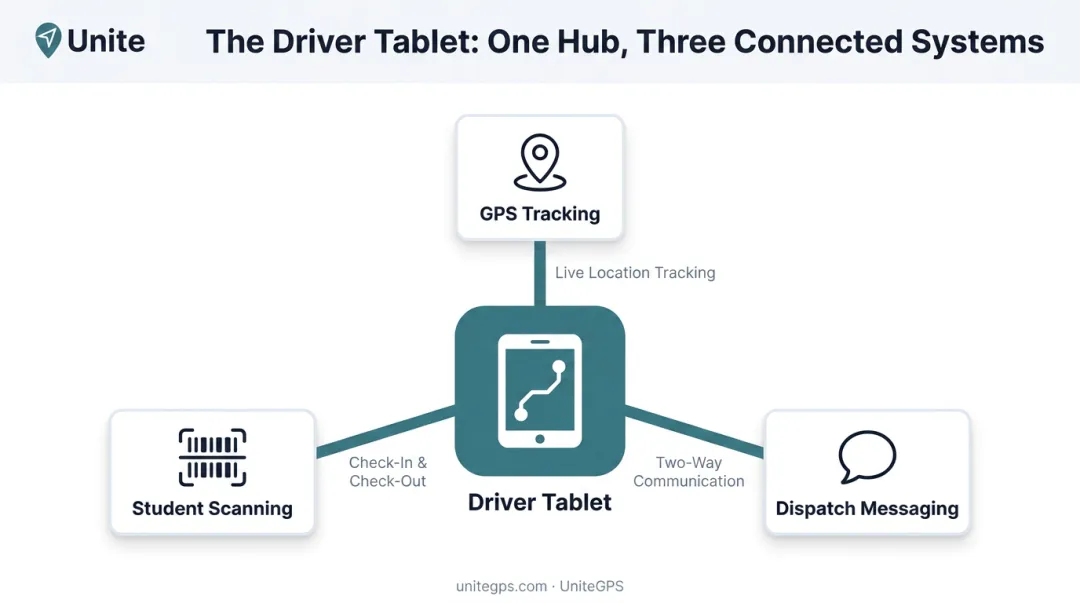
Tablets rarely operate alone. Most districts pair them with GPS hardware for live location tracking and barcode or RFID scanning equipment for student check-in and check-out. The tablet becomes the driver-facing screen for the district's full transportation platform, not a standalone gadget bolted to the dashboard.
That distinction matters. A tablet that only displays a map solves one problem. A tablet connected to routing, ridership, and dispatch data solves several at once:
- Missed stops caused by driver confusion or unfamiliar routes
- Uncertainty about which students actually boarded or exited
- Delayed communication between the bus and the transportation office
- Paper records that can't be searched, verified, or exported
UniteGPS's own product history illustrates this same shift toward integration. The company launched GPS tracking and routing together in 2015, then added ridership tracking through bus tablets in 2019 once districts said knowing "who's actually on the bus" mattered as much as parent-facing visibility. That progression (core routing and GPS first, tablet-based ridership tracking later) reflects how most districts still build out their transportation technology today.
Key Advantages of Driver Tablets in School Bus Operations
The advantages below tie directly to metrics transportation directors already track: on-time performance, driver retention, parent call volume, and compliance documentation. None of this is theoretical.
Many of these advantages compound when tablets are part of an integrated platform, pulling from the same routing and GPS data, rather than deployed as a standalone navigation app with no connection to ridership or dispatch systems.
Turn-By-Turn Navigation & Simplified Substitute Driver Operations
Tablets deliver live turn-by-turn directions, stop sequences, and passenger counts for every stop on a route, replacing the static paper route sheet a driver used to keep folded on the dashboard. UniteGPS's Crosswalk tablets add audible directions on top of the visual route, so drivers hear the next turn instead of glancing down at a screen.
This matters most for substitute and new drivers. Instead of relying on memorized routes or a veteran driver's mental map, an unfamiliar driver gets step-by-step guidance, stop-by-stop student names, and school destinations shown in real time.
Why this is an advantage
Route confusion and missed stops rank among the top causes of delays and parent complaints. A national survey from NAPT, NASDPTS, and NSTA of nearly 1,500 school bus operators found 51% described their driver shortage as severe or desperate, and 78% said the problem was getting worse.
When districts lean on substitutes and reassigned routes to cover gaps, in-cab navigation stops being a convenience and becomes an operational necessity.
Indian Prairie School District 204 offers a real-world example. Facing daily shortages of 30 to 40 drivers, the district paired tablets with routing software and GPS to split and reassign routes on short notice. Reported on-time performance climbed from roughly 80-85% to 90-98%, a combined result of technology and process changes working together.
KPIs impacted:
- On-time percentage
- Route completion accuracy
- Substitute driver training time
- Missed-stop incidents
When this advantage matters most: during active driver shortages, heavy substitute usage, mid-year route reassignments, or new driver onboarding at the start of a school year.
Real-Time Student Ridership Tracking & Safety Accountability
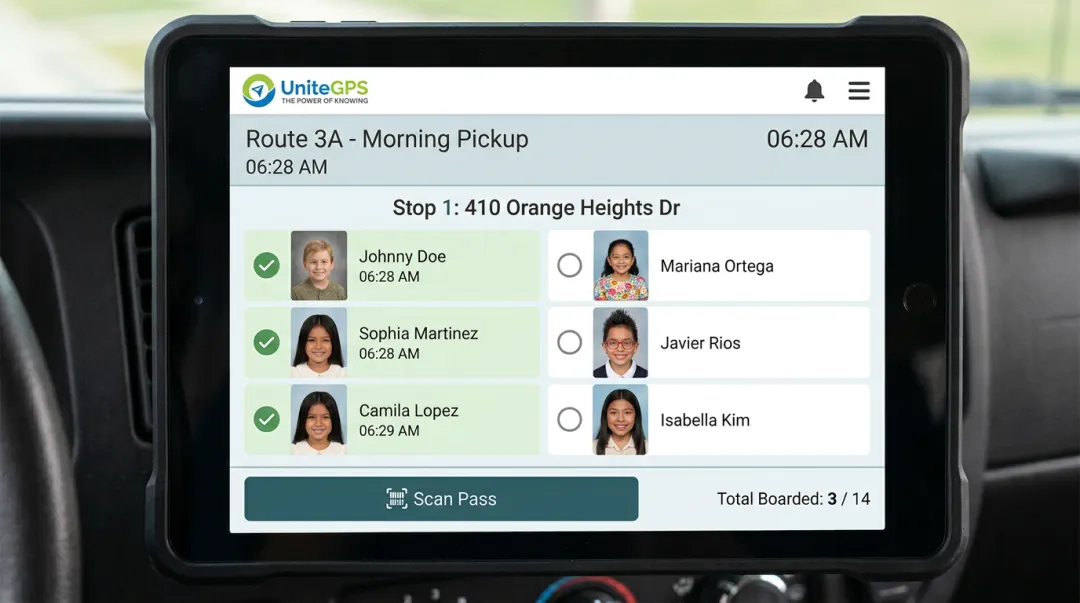
Pairing a tablet with barcode or RFID scanning lets drivers confirm exactly which students boarded and exited at each stop, replacing the manual headcount a driver used to do by memory or clipboard tally. UniteGPS's Crosswalk system uses barcode scanning specifically: students scan an ID card, or even a picture of their barcode, and the tablet logs every scan with a timestamp.
That scan creates a digital record accessible to administrators and parents in near real time. It closes the gap between "the bus left the yard" and "the student arrived home safely," a gap that used to depend entirely on driver memory.
Why this is an advantage
Ridership visibility directly reduces safety incidents tied to wrong-stop drop-offs and unaccounted-for students. School Transportation News has documented that tablet use in bus cabs centers heavily on work-related functions like navigation, communication, and student ID scanning, confirming these devices now handle core operational tasks daily.
Accurate ridership data also feeds compliance reporting. For students with IEPs, timestamped scan records give districts a defensible answer when a parent disputes a pickup or drop-off. Even a student who forgets an ID card still gets tracked if the system flags an unmatched rider, removing a common blind spot in special education transportation records.
KPIs impacted:
- Ridership accuracy rate
- Safety incident reports
- Parent complaint volume
- Compliance audit readiness
When this advantage matters most: for districts transporting students with IEPs, districts pursuing Medicaid reimbursement, or any office fielding frequent "did the bus stop there" calls.
Tim Lyons, Director of Transportation at Benton Community School District, put it plainly:
"If a parent calls saying that the bus didn't stop, we can look and see that they were there. It has made a huge difference in our district."
That's ridership tracking turning a he-said-she-said dispute into a two-minute lookup.
Faster Dispatch Communication & Paperless Operations
Tablets give drivers a communication channel back to dispatch for delays, emergencies, and route changes, replacing the reliance on two-way radios and phone trees. Crosswalk's Communication Center centralizes driver messaging and automated parent notifications into one message log, so a route change doesn't depend on a chain of individual phone calls.
Tablets also digitize the paperwork drivers used to file by hand. Pre-trip and post-trip vehicle inspections move from a clipboard to the tablet screen, and drivers can attach photos of problems like cracked glass or worn tires that get sent directly to mechanics.
Why this is an advantage
Faster incident reporting reduces downtime during breakdowns or road incidents. First Student and Tyler Technologies piloted a custom tablet solution at seven sites nationwide starting in 2019, built to integrate route, driver, vehicle, GPS, and payroll data, with a "Motion Lock" feature disabling driver interaction while the bus was moving.
The pilot's stated goal was standardizing training and eliminating paper route sheets across a large, distributed fleet.
Digital inspection logs also cut administrative hours transportation offices spend re-entering paper forms into spreadsheets. When a report goes straight from a driver's tablet to a mechanic's screen, nobody has to retype it later.
KPIs impacted:
- Incident response time
- Administrative hours saved per week
- Payroll processing accuracy
- Parent call volume to the transportation office
When this advantage matters most: large fleets, high parent call volume, or offices with limited back-office administrative staff. A district running 40 buses generates 40 daily pre-trip inspections alone. Digitizing that single workflow removes a meaningful stack of paper before dispatch communication even enters the picture.
What Happens When Driver Tablets Are Missing or Ignored
Districts still relying on paper route sheets and two-way radios tend to see inconsistent on-time performance, especially whenever a substitute has to cover an unfamiliar route. Without turn-by-turn guidance, a sub either calls dispatch for directions or falls back on a printed map, and either option costs minutes at every stop.
The manual gaps don't stop at routing. Student headcounts carry the same risk. A driver counting heads by memory has no digital backup if a count gets missed. That raises the odds of an unaccounted-for student going unnoticed until a parent calls asking where their kid is, and it slows incident response since there's no timestamped record to check.
The administrative cost adds up too. Without digitized ridership and inspection data, transportation offices spend more staff hours on:
- Manually compiling ridership data for state or Medicaid reporting requirements
- Re-entering paper timesheets and inspection forms into payroll or maintenance systems
- Answering repetitive parent calls asking where the bus is, with no live tracking to point families toward instead
Paper-based districts can still run safe operations, but every task takes longer. Each gap in the record becomes a harder question to answer when a parent or state auditor asks for proof.
How to Get the Most Value from Driver Tablets
Tablets deliver the most value when they're one piece of a connected transportation platform, tied directly into routing, GPS, and ridership data. A tablet that only shows a map leaves ridership tracking, dispatch communication, and compliance reporting as separate manual processes.
Integration alone won't get drivers to use the tablet, though. Keep the interface simple. Ongoing driver training matters, but so does the software itself.
A cluttered tablet interface with too many buttons tends to go unused, or worse, becomes a distraction. Look for a driver-facing screen built around a handful of core tasks: navigation, student scanning, inspection forms. Nothing else should compete for a driver's attention while the bus is moving.
A simple interface still needs room to grow. Weigh the upgrade path alongside the price tag. Districts rarely need every feature on day one. UniteGPS built Crosswalk around this reality: districts typically start with basic routing and GPS tracking, then add tablet-based ridership tracking once they're ready. Every upgrade carries existing routes and student data forward, so nothing gets rebuilt from scratch.
A few things worth checking before signing a contract:
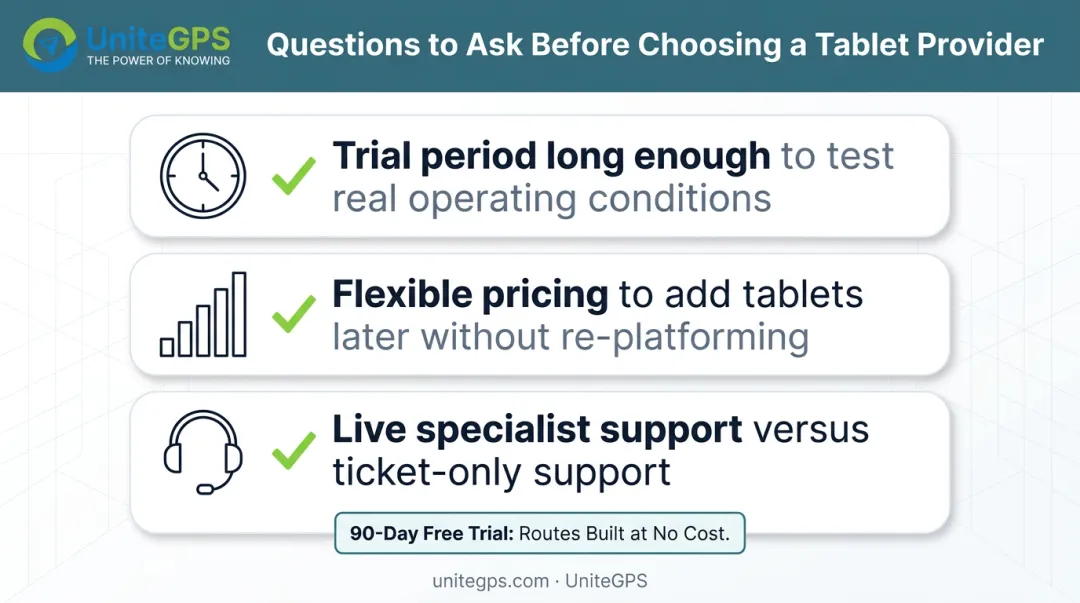
- Does the provider offer a trial period long enough to test real operating conditions? UniteGPS offers a 90-day free trial with routes built by their team, no credit card required.
- Is there a tiered pricing structure that lets a district add tablets later without re-platforming?
- Does support come with live specialists, or does every question turn into a support ticket?
The providers worth betting on are the ones planning for a decade of partnership rather than a single hardware sale.
Conclusion
Driver tablets matter because they replace fragmented paper processes and disconnected communication with one reliable in-cab tool. A route sheet, a headcount, a radio call, and a paper timesheet all become the same device.
The advantages compound over time. A district that starts with GPS routing and later adds tablet-based ridership tracking usually gets more value from the tablet than one deployed without supporting data, and that shows up in a few concrete ways:
- Substitute drivers onboard faster with turn-by-turn navigation already loaded
- Ridership tracking gets more accurate as scan data accumulates
- Administrative staff spend less time chasing timesheets and radio logs
Tablet adoption delivers the most value as one stage in an ongoing technology strategy, built on existing routing and ridership data. UniteGPS's Tablet Suite layers onto that foundation, giving districts a clear upgrade path from basic routing to full in-cab navigation.
Frequently Asked Questions
Can I use live bus tracking on my phone?
Most modern school transportation platforms, including UniteGPS, offer parent-facing apps showing live bus location. That data comes from the same GPS feed captured by the driver's in-cab tablet.
Are driver tablets in school buses a safety distraction?
Transportation-grade tablet software is built to prevent distraction, using audible turn-by-turn directions so drivers don't need to read the screen while moving. Many platforms also restrict touch interaction once the bus is in motion.
What features do school bus driver tablets typically include?
Standard features include turn-by-turn navigation, student ridership scanning, dispatch messaging, digital pre/post-trip inspections, and mileage tracking. More advanced suites add IEP/Medicaid invoicing and safety-compliance audit trails.
How much does it cost to add tablets to a school bus fleet?
Costs vary by hardware ruggedness and software integration. UniteGPS's Tablet Suite runs about $39 per bus per month, plus a one-time hardware cost near $1,699 per bus and an annual data plan.
Do driver tablets help substitute drivers who don't know the route?
Yes. Turn-by-turn audio and visual guidance, paired with stop-by-stop passenger data, shortens the learning curve for a substitute covering an unfamiliar route.
Can driver tablets support Medicaid billing and reimbursement?
Timestamped ridership scans create a documentation trail showing exactly which eligible students rode which bus and when. Districts use that data to support Medicaid reimbursement claims for special education transportation.